
CloudEdge
Hangzhou Meari Technology Co., Ltd.Lifestyle
4.314.32K Reviews
- Version
- 6.3.2
- Installs
- 1.00M
- Age Rating
- Everyone
Screenshots
Our Review of CloudEdge
 Analysis by Appyee
When a camera alert arrives while I’m away, the useful part is not the notification itself; it’s being able to open the app and check what is happening. That quick path from alert to live view is the capability I would focus on with CloudEdge. It is a Lifestyle app from Hangzhou Meari Technology Co., Ltd., built around video services for homes and businesses. I see its value less as a general smart-home hub and more as a way to check a compatible monitoring device without being in the same place.
Checking a camera when you are not there
The idea is simple: use the app to view video from a connected device and respond when something catches your attention. That can be more useful than receiving a bare alert, because a notification tells you that movement was detected, while a live view can help you judge whether it needs action. For someone who checks on a front door, a pet, or a workspace, that distinction is the practical heart of the experience.
I would treat remote viewing as a helpful check-in, not as a substitute for being physically present or for a carefully planned security setup. A phone screen gives only the camera’s point of view, and the usefulness of any monitoring app depends on having a compatible device in the right place and a reliable connection at both ends.
How the alert-to-view routine works
In everyday use, I would keep the routine focused: notice an alert, open the relevant camera, look at the scene, and decide whether anything needs attention. This is a small workflow, but reducing the effort between notification and video matters when you are standing in a checkout line or stepping out of a meeting. It is also a sensible way to avoid treating every movement alert as an emergency.
A practical tip is to think through what each camera is meant to answer before relying on it. A camera aimed at a doorway may help you check whether someone is there; one pointed at a shared room may be more appropriate for checking on a pet. Placement and viewing angle affect what you can learn, so the app cannot compensate for a camera that faces the wrong direction or misses the area you care about.
It is also worth deciding who genuinely needs access before sharing a device. A household may want more than one person to check a feed, but broad access can make it harder to keep track of who is using it. I would keep access limited to the people who need it and agree on what the camera is for, especially if it covers a space used by family members or colleagues.
A realistic reason to keep it on your phone
Imagine leaving home while expecting a delivery. If a notification comes in, you can check the camera view and decide whether to return a call, give instructions, or simply carry on with your day. That is a more useful outcome than repeatedly opening a camera at random intervals. The same check-in pattern can help when you want to see whether a pet is resting or whether a work area appears undisturbed.
The key is to use the video to answer a specific question rather than watching continuously. That keeps the app’s role clear and makes alerts less likely to become background noise. If you find yourself checking repeatedly without learning anything new, changing the camera’s purpose or notification habits may help more than adding more screen time.
Where it fits among monitoring options
Compared with checking a camera only when you are at home, remote video access is naturally more useful when you travel, commute, or manage a property from another location. Compared with a general smart-home app, a video-service app is a more focused choice when the main job is checking a camera feed. I would not choose it as the center of a broader home-automation plan unless the devices and services I already use work with it.
There is also a trade-off between convenience and attention. A camera can make it easier to verify what is happening, but frequent alerts can interrupt the day if the monitored area has routine movement. Before depending on notifications, I would consider whether the camera’s view is likely to capture ordinary activity as well as events I care about. The more clearly I define what counts as worth checking, the more valuable the alerts become.
Who gets the most from this approach
This app is most appealing to someone who already has, or plans to use, a compatible monitoring device and wants to check video away from home or work. It may also suit a small business owner who needs occasional visibility into a space without making constant trips there. The strongest fit is a person with a specific place to monitor and a clear reason to view it remotely.
I would skip it if I had no compatible device, wanted a purely local camera setup, or needed a single app to manage a wide range of unrelated smart-home products. It is also a poor fit for anyone who expects a phone app alone to provide complete security. Good placement, sensible access choices, and a realistic understanding of what a camera can show remain essential.
Getting Started with CloudEdge
Installing CloudEdge was a breeze. Available for both Android and iOS, the app walks you through the setup process with straightforward instructions. Once downloaded, you’ll need to create an account, which is quick and doesn’t require too much info—just your email and a password. I appreciated how simple it was to get up and running without any unnecessary hurdles.
It is free to download and is rated for Everyone. Its current version is 6.1.3, and it requires Android 5.0 or later. The app has a 4.4 average from around 88,000 ratings, with more than 1 million installs. Those figures suggest it has found a substantial audience, though they cannot tell you whether it will suit a particular camera or household routine.
Features That Make a Difference
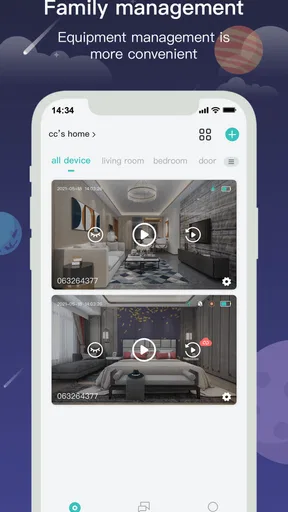
One of the first things I noticed was the user-friendly interface. The dashboard is clean and intuitive, which is perfect for someone like me who wants to get things done without clicking through endless menus.
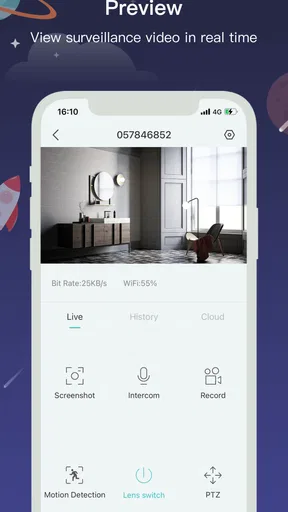
The app supports a variety of security devices, from cameras to smart doorbells. The real-time video streaming is crystal clear, even over cellular data. I tested it with a smart camera in my living room, and I could see everything with zero lag. It’s like being at home without actually being there.
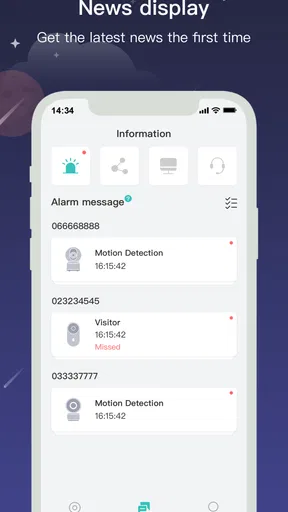
A particular highlight is the motion detection alerts. As soon as the app senses movement, you get an instant notification. I was at the grocery store when I got an alert, and within seconds, I was viewing a live feed of a sneaky squirrel trying to raid my bird feeder! It’s both fun and reassuring to know that I can see what’s happening at any time.
One useful habit is to pause before acting on an alert and check the live scene first. Movement may be ordinary activity rather than a problem, and a quick look can help avoid unnecessary worry. If several people share monitoring duties, agreeing on who should respond can also prevent duplicate calls or messages when an alert arrives.
Integration and Connectivity
The app plays nicely with other smart home devices, which is a huge plus. If you’re already using Alexa or Google Home, you can integrate them with your CloudEdge setup. This kind of seamless communication between devices makes managing your home even easier.
Connectivity is robust, and I rarely experienced dropouts. The app connects over Wi-Fi and cellular networks, and switching between them was smooth. It’s nice to know that even if your Wi-Fi goes down, you’re still connected.
For a useful remote check, remember that the phone’s connection is only one part of the path: the camera also needs to be reachable. If a feed does not load, I would first check whether the camera is powered and connected, then try again from a stable network. This simple order helps separate a temporary connection issue from a problem with the device or its placement.
Security and Privacy
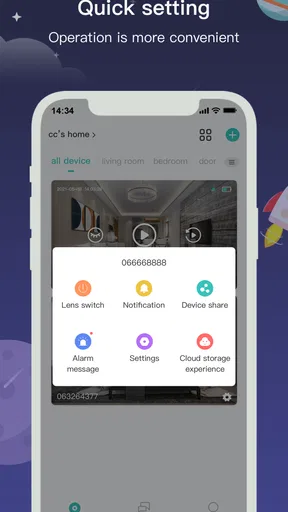
Security is obviously a big concern with any monitoring app. Thankfully, CloudEdge uses encrypted data transmission, which adds a layer of protection to your video feeds. You can also set up multiple user accounts, which is great if you want to share access with family members without compromising your data.
Privacy settings are customizable, allowing you to decide who can see what and when. This feature gave me peace of mind knowing that my data wasn't just floating around out there.
I would still treat camera access as something to review from time to time. Remove access for people who no longer need it, and think carefully about whether a camera should cover a private or shared area. Encryption is reassuring, but good habits around account access and camera placement are part of using any monitoring service responsibly.
Practical Everyday Use
Using CloudEdge in everyday life is surprisingly practical. Whether it’s checking in on pets, ensuring your kids made it home safely, or monitoring a package delivery, the app keeps you informed and in control. The two-way audio feature is also handy; you can communicate directly through your devices, which I found useful when a delivery person needed instructions.
Battery consumption is reasonable, which is often a concern with apps that require constant connectivity. I didn’t notice any significant drain on my phone’s battery, even with frequent usage throughout the day.
For a household, I would decide in advance which situations call for a live check and which do not. A camera can help confirm that a room looks normal, but it cannot guarantee that everything is safe or that a person has seen a message. If you are checking that a child has arrived, for example, use the camera as one source of reassurance rather than the only way you communicate.
Cost and expectations
The app is free to install, while in-app purchases range from $1.99 to $359.99 per item. That is a broad span, so I would look closely at the specific purchase and whether it is relevant to the way I intend to use the app before paying. The basic decision should be driven by the monitoring setup I need, not by assuming that every optional purchase is essential.
That distinction is useful when comparing it with alternatives. Some people may prefer a camera maker’s own app because it is designed around one product line; others may favor a broader home platform if their priority is coordinating many kinds of devices. CloudEdge makes more sense when its supported equipment matches what you have and remote video checks are the main task. I would compare device compatibility and the particular service terms before building a setup around any one app.
Final Thoughts
Overall, CloudEdge is a solid choice for anyone looking to enhance their home security or maintain a watchful eye over their property. It’s packed with features, easy to use, and integrates well with other smart devices. Whether you’re tech-savvy or a complete newbie, this app makes home monitoring accessible and straightforward.
If you’re considering upping your security game or just curious about keeping an eye on things from afar, give CloudEdge a try. It’s more than just a tool; it’s a peace-of-mind provider that'll keep you connected wherever you are.
My recommendation comes with one practical condition: choose it because you have a compatible device and a clear reason to check its video, not because an app alone can solve every security concern. Used for focused check-ins, it can make a familiar camera more useful when you are away. If you want a different kind of system, or prefer not to rely on remote monitoring, a simpler or more specialized alternative may be a better match.
Verdict
Strengths of CloudEdge
- User-friendly interface for easy navigation.
- Real-time alerts for enhanced security.
- Customizable settings for personalized use.
- Supports multiple devices seamlessly.
- Cloud storage available for easy access.
Limitations of CloudEdge
- Limited free storage space available.
- Occasional connectivity issues reported.
- Requires stable internet for optimal use.
- Some features locked behind paywall.
- App updates can be slow to release.
Similar Picks in This Category
View All
SmartThings
Samsung Electronics Co., Ltd.4.6

Google Home
Google LLC4.0

Pinterest4.2

Astrotalk - Talk to Astrologer
Astrology & Horoscope4.7

My Verizon
Verizon Consumer Group4.5

Samsung Wallet (Samsung Pay)
Samsung Electronics Co., Ltd.4.1
Frequently Asked Questions
What features does the CloudEdge app offer?
CloudEdge provides a comprehensive suite of features for managing and monitoring smart security cameras. Users can enjoy live video streaming, motion detection alerts, two-way audio communication, and video playback. The app also supports multiple devices, allowing you to manage multiple cameras from different locations seamlessly.
Is CloudEdge compatible with all smart cameras?
CloudEdge is compatible with a wide range of smart cameras, but it's essential to check if your specific camera model is supported. The app frequently updates to include more devices, so it's wise to consult the official compatibility list on their website or app store page before purchasing or downloading.
How secure is the CloudEdge app in protecting my data?
CloudEdge employs robust encryption protocols to ensure your data and video footage are protected. User privacy is a top priority, and the app is designed to prevent unauthorized access. Regular updates are rolled out to enhance security features, ensuring your information remains confidential.
Can I access CloudEdge on multiple devices simultaneously?
Yes, CloudEdge allows users to access their account from multiple devices at the same time. This is particularly useful for families or businesses where multiple people need to monitor security cameras. Just ensure each device is logged in with the same account credentials for seamless access.
Does CloudEdge offer customer support if I encounter issues?
CloudEdge provides comprehensive customer support through their app and website. Users can access FAQs, troubleshooting guides, and direct contact options for technical support. Whether you encounter installation issues or need help with features, the support team is available to assist you promptly.
